IDEAS JOURNAL / DESK & WORK

Switch Cradle: adjustable side clamps for an under-desk switch

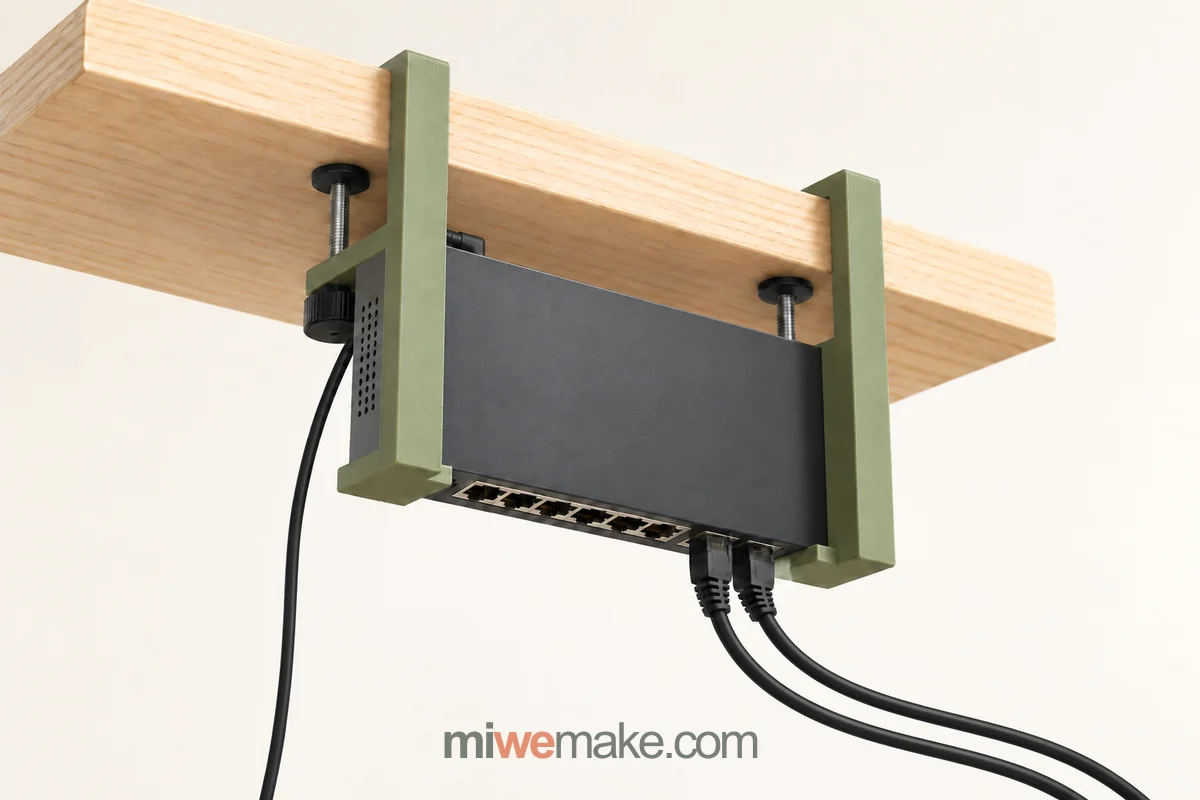
A pair of independent side mounts explores a flexible way to keep a desktop network switch below the desk. Their spacing adjusts to the case, with the ports facing down.

Human–AI co-created concept of two olive side clamps and support lips holding a network switch below a desk, with ports and cables facing down
HUMAN–AI CO-CREATION

Human direction and AI visualisation. Geometry, materials and manufacture need project-specific review.

01

Start with two independent mounts

The human brief is deliberately simple: one mount on either side of the switch, both fixed to the rear or side edge of the desk. Bring them inward to meet the case, then lock their positions. AI visualisation explores that arrangement, keeping the device and its cables beneath the working surface. The concept does not depend on the switch having its own mounting holes.

02

Adjust the spacing, support the edges

Each olive side arm connects to its own desk clamp. A short inward-facing lip supports the outer casing edge below it. Contact pads could cushion the ends of the case and help locate it. Moving the two mounts along the desk edge changes their spacing. The side arms position the case; the lips provide support beneath it. How well the locked mounts hold their positions still needs a physical sample check.

03

Leave the connections within reach

The broad case face is vertical and the narrow Ethernet panel faces down. Support lips need to stay outside the socket row, leaving access to the plug latches. Network and power leads remain below the desk, with enough room for their connectors and cable bends. Contact areas must be checked against the actual vents and power inlet rather than placed over them.

04

Give each fixing point a clear job

The desk clamp grips the wood between its fixed upper jaw and a lower pressure pad, moved by a thumb screw from below. Its continuous side arm carries the device support. Desk thickness, edge shape, grip depth, pad contact and tightening access all need to work together. Printed sections, metal threaded hardware and contact pads would be reviewed for the intended loads and repeated use.

05

Define the fit range before making a sample

Adjustable spacing can accommodate different case widths, but compatibility also depends on case depth, shape, mass and openings. Share desk and device dimensions, photographs of the intended mounting position, vent and connector locations, quantity and destination. A first sample would check installation, position retention, bottom support, cable access and removal. Fit and load limits would be established before claiming compatibility.

DESIGN NOTES

What gives the
idea its character.

  • Independent left and right mounts adjust to the case width
  • Side arms position the case; small lips support its outer edges
  • Downward-facing ports keep network and power leads below the desk
QUESTIONS BEFORE MAKING

What still needs
to be worked out.

  • What case widths, depths and weights can the mounts accommodate while keeping vents and connectors clear?
  • Can both desk clamps lock their positions, maintain pad contact and allow practical installation and removal?
  • Which printed sections, metal hardware and contact pads should be checked in the first physical sample?

YOUR VERSION STARTS HERE

Keep the spark.
Change the details.

Tell us what appeals to you and what the object needs to do. This enquiry carries the concept reference into your brief; material, design work, quantity and manufacturing are reviewed separately.

Human review · no automatic price
Concept reference: MJ-20261030-06
Explore materials and finishes

YOUR MANUFACTURING REFERENCE

Keep the details
connected.

These are choices from an illustrative concept. They help explain your enquiry; they are not a specification for your own part.

Selections stay in this browser tab. Notes and files are sent only when you submit an enquiry.

LET’S MAKE SOMETHING

01 / Your starting point02 / Project details03 / Submitted

Where are
we starting?

A drawing, a sample or a requirement.
Tell us what needs to be made.

No account needed.

PROJECT PRIVACY

Your project.
Handled with care.

When you send a project, Miwe S&T Co., Ltd. receives your contact details, project brief and selected files through Cloudflare and email. We use them to review and respond to your request and arrange agreed manufacturing services. Relevant technical information may be shared with manufacturing providers as needed for your project.

Files are sent as email attachments; this form does not create public file links or save a local draft. Email records may be retained for project correspondence and business records. Contact info@miwemake.com to ask about access, correction or deletion. Agree any NDA and restricted-file handling before sending sensitive designs.

Cloudflare Turnstile checks submissions to reduce abuse. Basic traffic measurement and limited campaign attribution help us understand how enquiries reach us; uploaded files and project text are not sent to traffic analytics. This website does not process payments. Cloudflare privacy policy.